


You can login to (using my preferences as an example) DDG and configure it to not use AI, but I mostly browse in private/incognito mode and don’t care to login to DDG every time I open a browser. However, I - and you - don’t have to login to enforce that preference; at least with DDG you can set a default search engine that automatically avoids it. Here are the parameters in mobile Firefox:

Even in Chrome and Chrome derivatives, you can set a default search engine; I don’t know the exact steps, but the end result should look similar to the above.
If you prefer to stick with Google, even they offer a no AI solution. I haven’t used Google in years, but according to arstechnica, this would be the equivalent configuration:
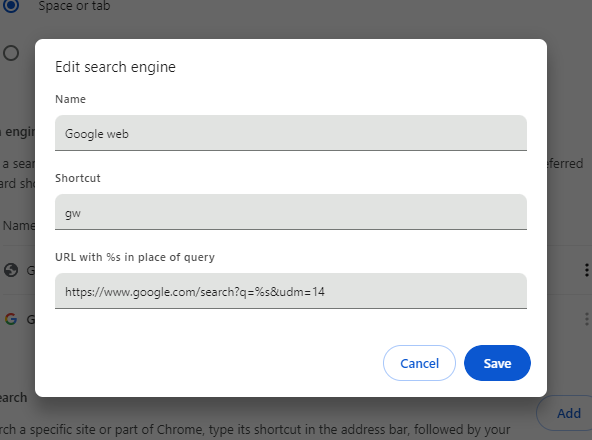
I’ve not used any other search engines since Altavista, so I can’t provide details for each one, but hopefully this is a good starting point.
edit: It seems this changed … Or maybe I had it wrong from the beginning, but I tested this when I posted it, so I think it changed. Regardless, the q= is not necessary currently.
would be cool if you could put the string in a codeblock for easy copying
For DDG,
https://noai.duckduckgo.com/?q=%25sBut it seems it changed, so
https://noai.duckduckgo.com/%sedit: as pointed out below, the first one (now corrected) was missing a ?. I am simply a dumbass for missing it. Hopefully that helps anyone coming on this in the future.
These are the ones I use (Kagi needs to be logged in, but you could use Privacy Pass with their extension for anonymous searching - I haven’t tested if it needs any extra configuration to block AI with Privacy Pass)
Name: Kagi
URL: <Copy Session Link from a logged in window>
Keyword: @k
Suggestion Url: https://kagisuggest.com/api/autosuggest?q=%25s

Name: DuckDuckGo.noai
URL: https://noai.duckduckgo.com/?start=1&q=%25s
Keyword: @d
Suggestion URL: https://ac.duckduckgo.com/ac/?type=list&q=%25s

Name: Brave.noai
URL: https://search.brave.com/search?summary=0&q=%25s
Keyword: @b
Suggestion URL: https://search.brave.com/api/suggest?q=%25s
The
start=1parameter on DDG keeps it from doing the first run popups when searching in private windows.Also, I haven’t tried but you can theoretically mix and match suggest URLs with different search engines if you wanted to somehow decouple search suggestions from actual searches.Edit: on second thought, that’s effectively just doubling the number of entities who know what you’re searching for. I see no privacy benefit to decoupling. Perhaps something to do if one engine’s suggestions are pure trash.
Why anyone would ever trust Brave after their affiliate link hijacking is beyond me.
They’re scummy crypto bros, but in my anecdotal testing, their search engine is more likely to turn up useful results than DDG.
They are, however, a fallback to the fallback in my search flow, so they get used like 1x/year. There would be little benefit to searching another Bing clone after DDG, and I have no interest in searching Google, so this is where I’ve landed.
Would be happy to expand the list if you have suggestions for search engines, and the associated codes for blocking AI summaries in private searches.